
Ford Focus Radio Codes
Get your Ford Focus radio code instantly by providing your  serial number below.
Finding Your Serial Number
Don’t know your serial number? Try this first 👇
Power radio on then..
Hold 1 + 6 → Serial starts with V (e.g. V123456)  Watch video
Hold 2 + 6 → Serial starts with M (e.g. M123456) Watch video
Can’t find serial number? See model-specific instructions below.
Ford 6000CD (2004 > 2007)
 Watch Video
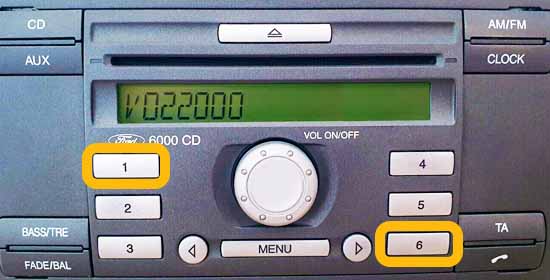
YThe 6000CD unit is commonly found in Ford Transit and Focus models.
To get the serial, press and hold 1 & 6 buttons until the cycle process starts.
Your serial will appear on-screen and begins with V followed by 6 numbers, for example V112233.
Ford 6000CD (2008 > 2012)
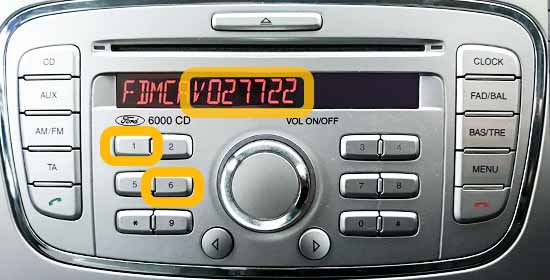
You can easily get the radio serial of your newer 6000CD radio, simply hold down 1 & 6 together until the cycle process starts.
Your serial number will appear at some point in the cycle process but may show a prefix before it, for example, if your serial showed: FDMCD0V027722, you would ignore the prefix entering: V027722 on the homepage.
Important note: Sometimes, the serial can show over 2 screens for example: FDD2007V0957 on the first screen then 20 on the second screen making the full serial with prefix: FDD2007V095720.
Ford Sony MP3
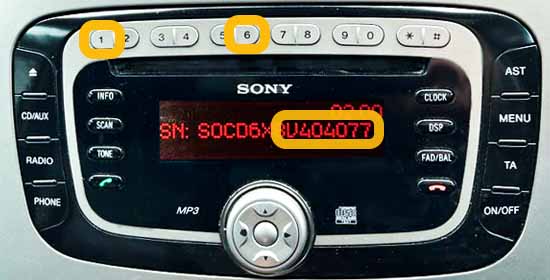
The Ford Sony MP3 unit is commonly found in Ford Mondeo, Focus, Galaxy & S-Max models.
To get the serial, hold down 1 & 6 buttons until the cycle process starts.
Just like in the picture above, this unit will display the serial with a prefix before it, you only need to enter the part starting from V onwards, for example for: SOCD6X8V404077 you would enter: V404077.
Ford 4500 RDS E-O-N
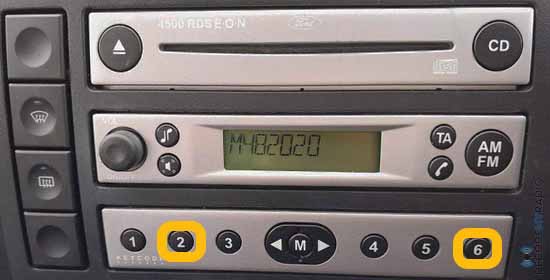 Watch Video
The 4500 RDS E-O-N unit is commonly found in Ford Fiesta models.
To get the serial, press and hold 2 & 6 buttons until the cycle process starts.
Your serial should appear on-screen and starts with M followed by 6 digits, for example M112233.
Ford 6000CD RDS E-O-N
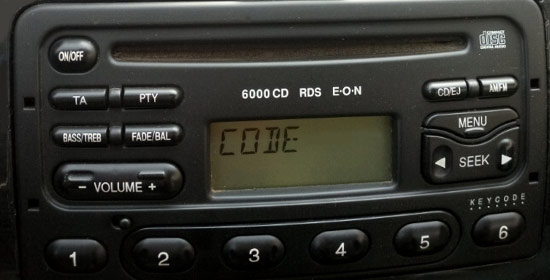
With this unit we need the serial from the radio label, it should start M followed by 6 digits, e.g. M123456 – please see instructions:
without radio release keys
Watch Removal Videowith radio release keys
Watch Removal VideoFord Travelpilot EX, NX & FX
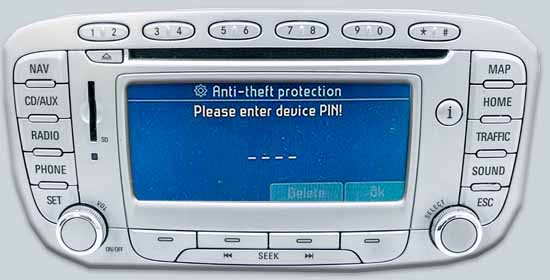
Travelpilot models are supported, but you will need to partly remove the unit using radio release keys to find the serial number on the printed label.
Please note, the serial number for these unit’s should start with C7 or BP for example: BP055366164122 or C7E3A055577340348.
Can’t Find Your Serial?
Please contact us and we will help you find your radio serial number.
Frequently Asked Questions
We currently support most Ford radio models before 2016 including: V-series, M-series, some Blaupunkt models, 6000CD, Sony MP3, 4500 RDS E-O-N, Navigation, 3000, 4000 RDS, 5000 RDS, 6000CD RDS E-O-N u0026 Travelpilot – to see the full list of compatible units see finding your Ford radio serial page.
Our service works with most radios found in Ford vehicles before 2016 – such as the Ford Fiesta, Ford Transit, Ford Focus, Ford Mondeo, Ford Galaxy, Ford KA & more.
This happens if you enter an incorrect code, allow 30-60 minutes and you should be able to re-enter the code again.
“LOCKED 10” means 10 wrong codes were entered and “LOCKED 13” means your radio is permanently locked after 13 wrong code entry attempts.
If you see “LOCKED 10” the good news is not all hope is lost, you can press and hold “6” for 10 seconds for your last 3 entry attempts.
Ford Focus radio codes are shown instantly on screen after payment as long as the serial number provided is correct.
Please see our how to enter your code page for code entry instructions and a video demonstration.
Yes, if your radio code doesn’t work, we will issue a new working code or a full refund.
We currently offer email support, please use the contact page to get in contact.